cytoflowgui.op_plugins.polygon#
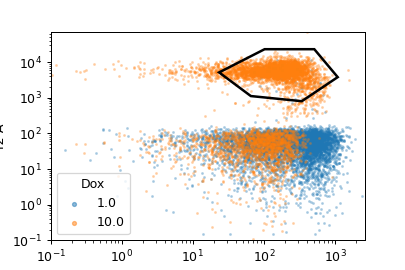
Draw a polygon gate. To add vertices, use a single-click; to close the polygon, click the first vertex a second time.
- Name
The operation name. Used to name the new metadata field that’s created by this module.
- X Channel
The name of the channel on the gate’s X axis.
- Y Channel
The name of the channel on the gate’s Y axis.
- X Scale
The scale of the X axis for the interactive plot.
- Y Scale
The scale of the Y axis for the interactive plot
- Hue facet
Show different experimental conditions in different colors.
- Subset
Show only a subset of the data.
- class cytoflowgui.op_plugins.polygon.PolygonViewParamsHandler(*args: Any, **kwargs: Any)[source]#
Bases:
Controller
- class cytoflowgui.op_plugins.polygon.PolygonHandler(*args: Any, **kwargs: Any)[source]#
Bases:
OpHandler
- class cytoflowgui.op_plugins.polygon.PolygonViewHandler(*args: Any, **kwargs: Any)[source]#
Bases:
ViewHandler