cytoflow.views.stats_2d#
Plots two statistics on a scatter plot.
Stats2DView – the IView class that makes the plot.
- class cytoflow.views.stats_2d.Stats2DView[source]#
Bases:
Base2DStatisticsViewPlot two statistics on a scatter plot. A point (X,Y) is drawn for every pair of elements with the same value of
variable; the X value is fromxfeatureand the Y value is fromyfeature.- variable#
The condition that varies when plotting this statistic: used for the x axis of line plots, the bar groups in bar plots, etc. Must be a level in the statistic’s index.
- Type:
Str
- xfeature#
The name of the column to plot on the X axis.
- Type:
Str
- xerror_low#
The name of the column containing the low values for the X error bars. If
xerror_lowis set,xerror_highmust be set as well.- Type:
Str
- xerror_high#
The name of the column containing the high values for the X error bars. If
xerror_highis set,xerror_lowmust be set as well.- Type:
Str
- yfeature#
The name of the column to plot on the Y axis.
- Type:
Str
- yerror_low#
The name of the column containing the low values for the Y error bars. If
yerror_lowis set,yerror_highmust be set as well.- Type:
Str
- yerror_high#
The name of the column containing the high values for the Y error bars. If
yerror_highis set,yerror_lowmust be set as well.- Type:
Str
- xscale#
The scale applied to X axis.
- Type:
{‘linear’, ‘log’, ‘logicle’}
- yscale#
The scale applied to Y axis.
- Type:
{‘linear’, ‘log’, ‘logicle’}
- statistic#
The statistic to plot. Must be a key in
Experiment.statistics.- Type:
Str
- xfacet#
Set to one of the index levels in the statistic being plotted, and a new column of subplots will be added for every unique value of that index level.
- Type:
String
- yfacet#
Set to one of the index levels in the statistic being plotted, and a new row of subplots will be added for every unique value of that index level.
- Type:
String
- huefacet#
Set to one of the index levels in the statistic being plotted, and a new colored artist (line, bar, etc) will be added for every unique value of that index level.
- Type:
String
- subset#
An expression that specifies the subset of the statistic to plot. Passed unmodified to
pandas.DataFrame.query.- Type:
Examples
Make a little data set.
>>> import cytoflow as flow
>>> import pandas as pd
>>> import_op = flow.ImportOp()
>>> import_op.tubes = [flow.Tube(file = "Plate01/RFP_Well_A3.fcs",
...                              conditions = {'Dox' : 10.0}),
...                    flow.Tube(file = "Plate01/CFP_Well_A4.fcs",
...                              conditions = {'Dox' : 1.0})]
>>> import_op.conditions = {'Dox' : 'float'}
>>> ex = import_op.apply()
Create two new statistics
>>> ch_op = flow.ChannelStatisticOp(name = 'MeanSDByDox',
...                     channel = 'Y2-A',
...                     function = lambda x: pd.Series({'Geo.Mean' : flow.geom_mean(x),
...                                                     'Geo.SD' : flow.geom_sd(x)}),
...                     by = ['Dox'])
>>> ex2 = ch_op.apply(ex)
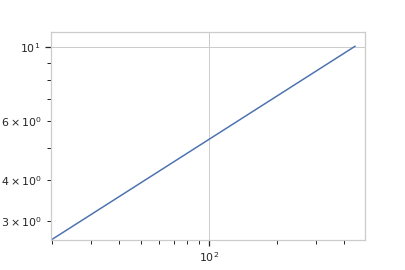
Plot the statistics
>>> flow.Stats2DView(variable = 'Dox',
...                  statistic = 'MeanSDByDox',
...                  xfeature = 'Geo.Mean',
...                  xscale = 'log',
...                  yfeature = 'Geo.SD',
...                  yscale = 'log').plot(ex2)
- plot(experiment, plot_name=None, **kwargs)[source]#
Plot a chart of two statistics’ values as a common variable changes.
- Parameters:
experiment (Experiment) – The
Experimentto plot using this view.title (str) – Set the plot title
xlabel (str) – Set the X axis label
ylabel (str) – Set the Y axis label
huelabel (str) – Set the label for the hue facet (in the legend)
legend (bool) – Plot a legend for the color or hue facet? Defaults to
True.legend_loc (str) – If we plot a legend, where should it go? This is a
matplotliblegend location string, like ‘lower right’ or ‘outside center right’. Default is ‘upper right’.sharex (bool) – If there are multiple subplots, should they share X axes? Defaults to
True.sharey (bool) – If there are multiple subplots, should they share Y axes? Defaults to
True.row_order (list) – Override the row facet value order with the given list. If a value is not given in the ordering, it is not plotted. Defaults to a “natural ordering” of all the values.
col_order (list) – Override the column facet value order with the given list. If a value is not given in the ordering, it is not plotted. Defaults to a “natural ordering” of all the values.
hue_order (list) – Override the hue facet value order with the given list. If a value is not given in the ordering, it is not plotted. Defaults to a “natural ordering” of all the values.
height (float) – The height of each row in inches. Default = 3.0
aspect (float) – The aspect ratio of each subplot. Default = 1.5
col_wrap (int) – If
xfacetis set andyfacetis not set, you can “wrap” the subplots around so that they form a multi-row grid by setting this to the number of columns you want.sns_style ({“darkgrid”, “whitegrid”, “dark”, “white”, “ticks”}) – Which
seabornstyle to apply to the plot? Default iswhitegrid.sns_context ({“notebook”, “paper”, “talk”, “poster”}) – Which
seaborncontext to use? Controls the scaling of plot elements such as tick labels and the legend. Default isnotebook.palette (palette name, list, or dict) – Colors to use for the different levels of the hue variable. Should be something that can be interpreted by
seaborn.color_palette, or a dictionary mapping hue levels to matplotlib colors. See https://seaborn.pydata.org/tutorial/color_palettes.html for a good overview.despine (Bool) – Remove the top and right axes from the plot? Default is
True.plot_name (str) – If this
IViewcan make multiple plots,plot_nameis the name of the plot to make. Must be one of the values retrieved fromenum_plots.xlim ((float, float)) – Set the range of the plot’s X axis.
ylim ((float, float)) – Set the range of the plot’s Y axis.
color (a matplotlib color) – The color to plot with. Overridden if
huefacetis notNonelinestyle ({‘solid’ | ‘dashed’, ‘dashdot’, ‘dotted’ | (offset, on-off-dash-seq) | ‘-’ | ‘–’ | ‘-.’ | ‘:’ | ‘None’ | ‘ ‘ | ‘’})
marker (a matplotlib marker style) – See http://matplotlib.org/api/markers_api.html#module-matplotlib.markers
markersize (int) – The marker size in points
markerfacecolor (a matplotlib color) – The color to make the markers. Overridden (?) if
huefacetis notNonealpha (the alpha blending value, from 0.0 (transparent) to 1.0 (opaque))
Notes
Other
kwargsare passed to matplotlib.pyplot.plot