cytoflow.operations.tsne#
Apply t-Distributed Stochastic Neighbor Embedding (tSNE) to flow data. This is
similar to principle component analysis, in that it is a dimensionality
reduction algorithm. Unlike PCA, it is non-linear and (supposedly) retains
internal structure better than PCA. tsne has one class:
tSNEOp – the IOperation that applies tSNE to an Experiment.
- class cytoflow.operations.tsne.tSNEOp[source]#
Bases:
HasStrictTraitsUse t-Distributed Stochastic Neighbor Embedding to reduce the dimensionality of the data set.
Call
estimateto compute the embedding.Calling
applycreates new “channels” named{name}_1and{name}_2, wherenameis thenameattribute. (Unlike PCA, tSNE only decomposes to two components.)The same decomposition may not be appropriate for different subsets of the data set. If this is the case, you can use the
byattribute to specify metadata by which to aggregate the data before estimating (and applying) a model. The tSNE parameters such as the perplexity are the same across each subset, though- name#
The operation name; determines the name of the new columns.
- Type:
Str
- channels#
The channels to apply the decomposition to.
- Type:
List(Str)
- scale#
Re-scale the data in the specified channels before fitting. If a channel is in
channelsbut not inscale, the current package-wide default (set withset_default_scale) is used.- Type:
Dict(Str : {“linear”, “logicle”, “log”})
- by#
A list of metadata attributes to aggregate the data before estimating the model. For example, if the experiment has two pieces of metadata,
TimeandDox, settingbyto["Time", "Dox"]will fit the model separately to each subset of the data with a unique combination ofTimeandDox.- Type:
List(Str)
- metric#
How to compute “distance”? If using many channels, try changing to
cosine.- Type:
Enum(“euclidean”, “cosine”) (default = “euclidian”)
- perplexity#
The balance between the local and global structure of the data. Larger datasets benefit from higher perplexity, but be warned – runtime scales linearly with perplexity!
- Type:
Float (default = 10)
- sample#
What proportion of the data set to use for training? Defaults to 1% of the dataset to help with runtime.
- Type:
Float (default = 0.01)
Notes
Uses
openTSNEby Pavlin G. Policar, Martin Strazar and Blaz Zupan [1]References
Examples
Make a little data set.
>>> import cytoflow as flow
>>> import_op = flow.ImportOp()
>>> import_op.tubes = [flow.Tube(file = "Plate01/RFP_Well_A3.fcs",
...                              conditions = {'Dox' : 10.0}),
...                    flow.Tube(file = "Plate01/CFP_Well_A4.fcs",
...                              conditions = {'Dox' : 1.0})]
>>> import_op.conditions = {'Dox' : 'float'}
>>> ex = import_op.apply()
Create and parameterize the operation.
>>> tsne = flow.tSNEOp(name = 'tSNE',
...                    channels = ['V2-A', 'V2-H', 'Y2-A', 'Y2-H'],
...                    scale = {'V2-A' : 'log',
...                             'V2-H' : 'log',
...                             'Y2-A' : 'log',
...                             'Y2-H' : 'log'},
...                    by = ["Dox"])
Estimate the decomposition
>>> tsne.estimate(ex)
Apply the operation
>>> ex2 = tsne.apply(ex)
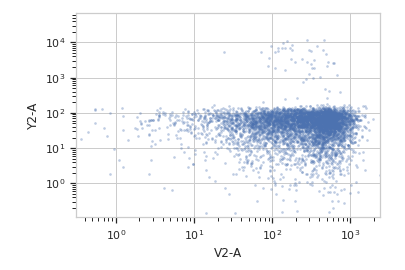
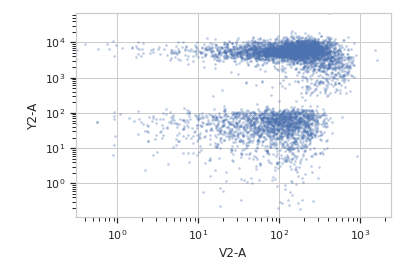
Plot a scatterplot of the decomposition. Compare to a scatterplot of the underlying channels.
>>> flow.ScatterplotView(xchannel = "V2-A",
...                      xscale = "log",
...                      ychannel = "Y2-A",
...                      yscale = "log",
...                      subset = "Dox == 1.0").plot(ex2)
>>> flow.ScatterplotView(xchannel = "tSNE_1",
...                      ychannel = "tSNE_2",
...                      subset = "Dox == 1.0").plot(ex2)

>>> flow.ScatterplotView(xchannel = "V2-A",
...                      xscale = "log",
...                      ychannel = "Y2-A",
...                      yscale = "log",
...                      subset = "Dox == 10.0").plot(ex2)
>>> flow.ScatterplotView(xchannel = "tSNE_1",
...                      ychannel = "tSNE_2",
...                      subset = "Dox == 10.0").plot(ex2)

- estimate(experiment, subset=None)[source]#
Estimate the decomposition
- Parameters:
experiment (Experiment) – The
Experimentto use to estimate the k-means clusterssubset (str (default = None)) – A Python expression that specifies a subset of the data in
experimentto use to parameterize the operation.
- apply(experiment)[source]#
Apply the tSNE decomposition to the data.
- Returns:
a new Experiment with additional
Experiment.channelsnamedname_1andname_2- Return type: