cytoflow.operations.gaussian
gaussian contains three classes:
GaussianMixtureOp – an operation that fits a Gaussian mixture
model to one or more channels.
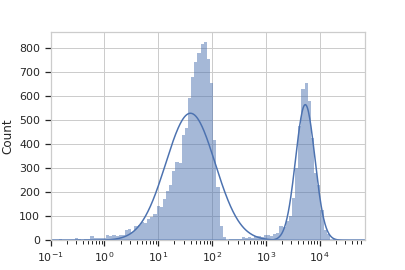
GaussianMixture1DView – a diagnostic view that shows how the
GaussianMixtureOp estimated its model (on a 1D data set,
using a histogram).
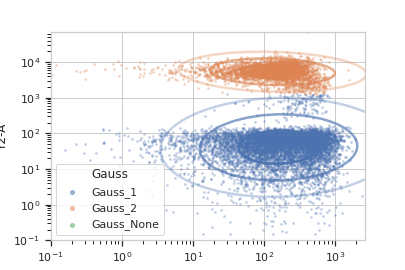
GaussianMixture2DView – a diagnostic view that shows how the
GaussianMixtureOp estimated its model (on a 2D data set,
using a scatter plot).
- class cytoflow.operations.gaussian.GaussianMixtureOp[source]
Bases:
traits.has_traits.HasStrictTraitsThis module fits a Gaussian mixture model with a specified number of components to one or more channels.
If
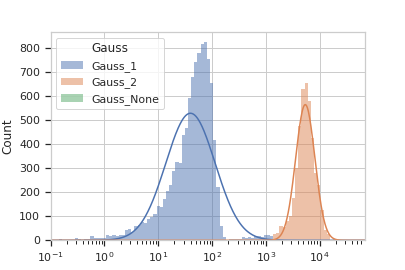
num_components> 1,applycreates a new categorical metadata variable namedname, with possible values{name}_1….name_nwherenis the number of components. An event is assigned toname_icategory if it has the highest posterior probability of having been produced by componenti. If an event has a value that is outside the range of one of the channels’ scales, then it is assigned to{name}_None.Optionally, if
sigmais greater than 0,applycreates newbooleanmetadata variables named{name}_1…{name}_nwherenis the number of components. The column{name}_iisTrueif the event is less thansigmastandard deviations from the mean of componenti. Ifnum_componentsis1,sigmamust be greater than 0.Note
The
sigmaattribute does NOT affect how events are assigned to components in the newnamevariable. That is to say, if an event is more thansigmastandard deviations from ALL of the components, you might expect it would be labeled as{name}_None. It is not. An event is only labeled{name}_Noneif it has a value that is outside of the channels’ scales.Optionally, if
posteriorsisTrue,applycreates a newdoublemetadata variables named{name}_1_posterior…{name}_n_posteriorwherenis the number of components. The column{name}_i_posteriorcontains the posterior probability that this event is a member of componenti.Finally, the same mixture model (mean and standard deviation) may not be appropriate for every subset of the data. If this is the case, you can use the
byattribute to specify metadata by which to aggregate the data before estimating (and applying) a mixture model. The number of components must be the same across each subset, though.- name
The operation name; determines the name of the new metadata column
- Type
Str
- channels
The channels to apply the mixture model to.
- Type
List(Str)
- scale
Re-scale the data in the specified channels before fitting. If a channel is in
channelsbut not inscale, the current package-wide default (set withset_default_scale) is used.- Type
Dict(Str : {“linear”, “logicle”, “log”})
- num_components
How many components to fit to the data? Must be a positive integer.
- Type
Int (default = 1)
- sigma
If not None, use this operation as a “gate”: for each component, create a new boolean variable
{name}_iand if the event is withinsigmastandard deviations, set that variable toTrue. Ifnum_componentsis1, must be> 0.- Type
Float
- by
A list of metadata attributes to aggregate the data before estimating the model. For example, if the experiment has two pieces of metadata,
TimeandDox, settingbyto["Time", "Dox"]will fit the model separately to each subset of the data with a unique combination ofTimeandDox.- Type
List(Str)
- posteriors
If
True, add columns named{name}_{i}_posteriorgiving the posterior probability that the event is in componenti. Useful for filtering out low-probability events.- Type
Bool (default = False)
Notes
We use the Mahalnobis distance as a multivariate generalization of the number of standard deviations an event is from the mean of the multivariate gaussian. If \(\vec{x}\) is an observation from a distribution with mean \(\vec{\mu}\) and \(S\) is the covariance matrix, then the Mahalanobis distance is \(\sqrt{(x - \mu)^T \cdot S^{-1} \cdot (x - \mu)}\).
Examples
Make a little data set.
>>> import cytoflow as flow
>>> import_op = flow.ImportOp()
>>> import_op.tubes = [flow.Tube(file = "Plate01/RFP_Well_A3.fcs",
...                              conditions = {'Dox' : 10.0}),
...                    flow.Tube(file = "Plate01/CFP_Well_A4.fcs",
...                              conditions = {'Dox' : 1.0})]
>>> import_op.conditions = {'Dox' : 'float'}
>>> ex = import_op.apply()
Create and parameterize the operation.
>>> gm_op = flow.GaussianMixtureOp(name = 'Gauss',
...                                channels = ['Y2-A'],
...                                scale = {'Y2-A' : 'log'},
...                                num_components = 2)
Estimate the clusters
>>> gm_op.estimate(ex)
Plot a diagnostic view
>>> gm_op.default_view().plot(ex)
Apply the gate
>>> ex2 = gm_op.apply(ex)
Plot a diagnostic view with the event assignments
>>> gm_op.default_view().plot(ex2)
And with two channels:
>>> gm_op = flow.GaussianMixtureOp(name = 'Gauss',
...                                channels = ['V2-A', 'Y2-A'],
...                                scale = {'V2-A' : 'log',
...                                         'Y2-A' : 'log'},
...                                num_components = 2)
>>> gm_op.estimate(ex)
>>> ex2 = gm_op.apply(ex)
>>> gm_op.default_view().plot(ex2)
- estimate(experiment, subset=None)[source]
Estimate the Gaussian mixture model parameters
- Parameters
experiment (Experiment) – The data to use to estimate the mixture parameters
subset (str (default = None)) – If set, a Python expression to determine the subset of the data to use to in the estimation.
- apply(experiment)[source]
Assigns new metadata to events using the mixture model estimated in
estimate.- Returns
A new
Experimentwith the new condition variables as described in the class documentation. Also adds the following new statistics:- meanFloat
the mean of the fitted gaussian in each channel for each component.
- sigma(Float, Float)
the locations the mean +/- one standard deviation in each channel for each component.
- correlationFloat
the correlation coefficient between each pair of channels for each component.
- proportionFloat
the proportion of events in each component of the mixture model. only added if
num_components> 1.
- Return type
- class cytoflow.operations.gaussian.GaussianMixture1DView[source]
Bases:
cytoflow.operations.base_op_views.By1DView,cytoflow.operations.base_op_views.AnnotatingView,cytoflow.views.histogram.HistogramViewA default view for
GaussianMixtureOpthat plots the histogram of a single channel, then the estimated Gaussian distributions on top of it.- facets
A read-only list of the conditions used to facet this view.
- Type
List(Str)
- by
A read-only list of the conditions used to group this view’s data before plotting.
- Type
List(Str)
- channel
The channel this view is viewing. If you created the view using
default_view, this is already set.- Type
Str
- scale
The way to scale the x axes. If you created the view using
default_view, this may be already set.- Type
{‘linear’, ‘log’, ‘logicle’}
- op
The
IOperationthat this view is associated with. If you created the view usingdefault_view, this is already set.- Type
Instance(
IOperation)
- subset
An expression that specifies the subset of the statistic to plot. Passed unmodified to
pandas.DataFrame.query.- Type
- xfacet
Set to one of the
Experiment.conditionsin theExperiment, and a new column of subplots will be added for every unique value of that condition.- Type
String
- yfacet
Set to one of the
Experiment.conditionsin theExperiment, and a new row of subplots will be added for every unique value of that condition.- Type
String
- huefacet
Set to one of the
Experiment.conditionsin the in theExperiment, and a new color will be added to the plot for every unique value of that condition.- Type
String
- plot(experiment, **kwargs)[source]
Plot the plots.
- Parameters
experiment (Experiment) – The
Experimentto plot using this view.title (str) – Set the plot title
xlabel (str) – Set the X axis label
ylabel (str) – Set the Y axis label
huelabel (str) – Set the label for the hue facet (in the legend)
legend (bool) – Plot a legend for the color or hue facet? Defaults to
True.sharex (bool) – If there are multiple subplots, should they share X axes? Defaults to
True.sharey (bool) – If there are multiple subplots, should they share Y axes? Defaults to
True.row_order (list) – Override the row facet value order with the given list. If a value is not given in the ordering, it is not plotted. Defaults to a “natural ordering” of all the values.
col_order (list) – Override the column facet value order with the given list. If a value is not given in the ordering, it is not plotted. Defaults to a “natural ordering” of all the values.
hue_order (list) – Override the hue facet value order with the given list. If a value is not given in the ordering, it is not plotted. Defaults to a “natural ordering” of all the values.
height (float) – The height of each row in inches. Default = 3.0
aspect (float) – The aspect ratio of each subplot. Default = 1.5
col_wrap (int) – If
xfacetis set andyfacetis not set, you can “wrap” the subplots around so that they form a multi-row grid by setting this to the number of columns you want.sns_style ({“darkgrid”, “whitegrid”, “dark”, “white”, “ticks”}) – Which
seabornstyle to apply to the plot? Default iswhitegrid.sns_context ({“paper”, “notebook”, “talk”, “poster”}) – Which
seaborncontext to use? Controls the scaling of plot elements such as tick labels and the legend. Default istalk.palette (palette name, list, or dict) – Colors to use for the different levels of the hue variable. Should be something that can be interpreted by
seaborn.color_palette, or a dictionary mapping hue levels to matplotlib colors.despine (Bool) – Remove the top and right axes from the plot? Default is
True.min_quantile (float (>0.0 and <1.0, default = 0.001)) – Clip data that is less than this quantile.
max_quantile (float (>0.0 and <1.0, default = 1.00)) – Clip data that is greater than this quantile.
lim ((float, float)) – Set the range of the plot’s data axis.
orientation ({‘vertical’, ‘horizontal’})
num_bins (int) – The number of bins to plot in the histogram. Clipped to [100, 1000]
histtype ({‘stepfilled’, ‘step’, ‘bar’}) – The type of histogram to draw.
stepfilledis the default, which is a line plot with a color filled under the curve.density (bool) – If
True, re-scale the histogram to form a probability density function, so the area under the histogram is 1.linewidth (float) – The width of the histogram line (in points)
linestyle ([‘-’ | ‘–’ | ‘-.’ | ‘:’ | “None”]) – The style of the line to plot
alpha (float (default = 0.5)) – The alpha blending value, between 0 (transparent) and 1 (opaque).
color (matplotlib color) – The color to plot the annotations. Overrides the default color cycle.
plot_name (Str) – If this
IViewcan make multiple plots,plot_nameis the name of the plot to make. Must be one of the values retrieved fromenum_plots.
- class cytoflow.operations.gaussian.GaussianMixture2DView[source]
Bases:
cytoflow.operations.base_op_views.By2DView,cytoflow.operations.base_op_views.AnnotatingView,cytoflow.views.scatterplot.ScatterplotViewA default view for
GaussianMixtureOpthat plots the scatter plot of a two channels, then the estimated 2D Gaussian distributions on top of it.- facets
A read-only list of the conditions used to facet this view.
- Type
List(Str)
- by
A read-only list of the conditions used to group this view’s data before plotting.
- Type
List(Str)
- xchannel
The channels to use for this view’s X axis. If you created the view using
default_view, this is already set.- Type
Str
- ychannel
The channels to use for this view’s Y axis. If you created the view using
default_view, this is already set.- Type
Str
- xscale
The way to scale the x axis. If you created the view using
default_view, this may be already set.- Type
{‘linear’, ‘log’, ‘logicle’}
- yscale
The way to scale the y axis. If you created the view using
default_view, this may be already set.- Type
{‘linear’, ‘log’, ‘logicle’}
- op
The
IOperationthat this view is associated with. If you created the view usingdefault_view, this is already set.- Type
Instance(
IOperation)
- subset
An expression that specifies the subset of the statistic to plot. Passed unmodified to
pandas.DataFrame.query.- Type
- xfacet
Set to one of the
Experiment.conditionsin theExperiment, and a new column of subplots will be added for every unique value of that condition.- Type
String
- yfacet
Set to one of the
Experiment.conditionsin theExperiment, and a new row of subplots will be added for every unique value of that condition.- Type
String
- huefacet
Set to one of the
Experiment.conditionsin the in theExperiment, and a new color will be added to the plot for every unique value of that condition.- Type
String
- plot(experiment, **kwargs)[source]
Plot the plots.
- Parameters
experiment (Experiment) – The
Experimentto plot using this view.title (str) – Set the plot title
xlabel (str) – Set the X axis label
ylabel (str) – Set the Y axis label
huelabel (str) – Set the label for the hue facet (in the legend)
legend (bool) – Plot a legend for the color or hue facet? Defaults to
True.sharex (bool) – If there are multiple subplots, should they share X axes? Defaults to
True.sharey (bool) – If there are multiple subplots, should they share Y axes? Defaults to
True.row_order (list) – Override the row facet value order with the given list. If a value is not given in the ordering, it is not plotted. Defaults to a “natural ordering” of all the values.
col_order (list) – Override the column facet value order with the given list. If a value is not given in the ordering, it is not plotted. Defaults to a “natural ordering” of all the values.
hue_order (list) – Override the hue facet value order with the given list. If a value is not given in the ordering, it is not plotted. Defaults to a “natural ordering” of all the values.
height (float) – The height of each row in inches. Default = 3.0
aspect (float) – The aspect ratio of each subplot. Default = 1.5
col_wrap (int) – If
xfacetis set andyfacetis not set, you can “wrap” the subplots around so that they form a multi-row grid by setting this to the number of columns you want.sns_style ({“darkgrid”, “whitegrid”, “dark”, “white”, “ticks”}) – Which
seabornstyle to apply to the plot? Default iswhitegrid.sns_context ({“paper”, “notebook”, “talk”, “poster”}) – Which
seaborncontext to use? Controls the scaling of plot elements such as tick labels and the legend. Default istalk.palette (palette name, list, or dict) – Colors to use for the different levels of the hue variable. Should be something that can be interpreted by
seaborn.color_palette, or a dictionary mapping hue levels to matplotlib colors.despine (Bool) – Remove the top and right axes from the plot? Default is
True.min_quantile (float (>0.0 and <1.0, default = 0.001)) – Clip data that is less than this quantile.
max_quantile (float (>0.0 and <1.0, default = 1.00)) – Clip data that is greater than this quantile.
xlim ((float, float)) – Set the range of the plot’s X axis.
ylim ((float, float)) – Set the range of the plot’s Y axis.
alpha (float (default = 0.25)) – The alpha blending value, between 0 (transparent) and 1 (opaque).
s (int (default = 2)) – The size in points^2.
marker (a matplotlib marker style, usually a string) – Specfies the glyph to draw for each point on the scatterplot. See matplotlib.markers for examples. Default: ‘o’
color (matplotlib color) – The color to plot the annotations. Overrides the default color cycle.
plot_name (Str) – If this
IViewcan make multiple plots,plot_nameis the name of the plot to make. Must be one of the values retrieved fromenum_plots.