cytoflow.operations.binning
binning has two classes:
BinningOp – divides events in a channel into bins of equal
width (after applying an optional scale)
BinningView – a default view to display the bins.
- class cytoflow.operations.binning.BinningOp[source]
Bases:
traits.has_traits.HasStrictTraitsBin data along an axis.
This operation creates equally spaced bins (in linear or log space) along an axis and adds a condition assigning each event to a bin. The value of the event’s condition is the left end of the bin’s interval in which the event is located.
- name
The operation name. Used to name the new metadata field in the experiment that’s created by apply()
- Type
Str
- channel
The name of the channel along which to bin.
- Type
Str
- scale
Make the bins equidistant along what scale?
- Type
{“linear”, “log”, “logicle”}
- bin_width
The width of the bins. If
scaleislog,bin_widthis in log-10 units; ifscaleislogicle, an error is thrown because the units are ill-defined.- Type
Float
Examples
Create a small experiment:
>>> import cytoflow as flow
>>> import_op = flow.ImportOp()
>>> import_op.tubes = [flow.Tube(file = "tasbe/rby.fcs")]
>>> ex = import_op.apply()
Create and parameterize the operation
>>> bin_op = flow.BinningOp()
>>> bin_op.name = "Bin"
>>> bin_op.channel = "FITC-A"
>>> bin_op.scale = "log"
>>> bin_op.bin_width = 0.2
Apply the operation to the experiment
>>> ex2 = bin_op.apply(ex)
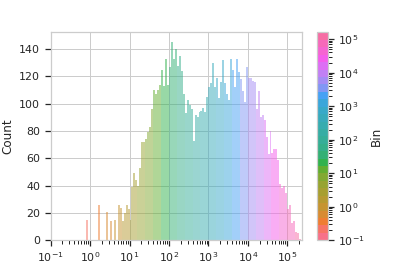
Plot the result
>>> bin_op.default_view().plot(ex2)
- apply(experiment)[source]
Applies the binning to an experiment.
- Parameters
experiment (
Experiment) – the old experiment to which this op is applied- Returns
A new experiment with a condition column named
name, which contains the location of the left-most edge of the bin that the event is in.- Return type
- class cytoflow.operations.binning.BinningView[source]
Bases:
cytoflow.operations.base_op_views.Op1DView,cytoflow.operations.base_op_views.AnnotatingView,cytoflow.views.histogram.HistogramViewPlots a histogram of the current binning op. By default, the different bins are shown in different colors.
- channel
The channel this view is viewing. If you created the view using
default_view, this is already set.- Type
Str
- scale
The way to scale the x axes. If you created the view using
default_view, this may be already set.- Type
{‘linear’, ‘log’, ‘logicle’}
- op
The
IOperationthat this view is associated with. If you created the view usingdefault_view, this is already set.- Type
Instance(
IOperation)
- subset
An expression that specifies the subset of the statistic to plot. Passed unmodified to
pandas.DataFrame.query.- Type
- xfacet
Set to one of the
Experiment.conditionsin theExperiment, and a new column of subplots will be added for every unique value of that condition.- Type
String
- yfacet
Set to one of the
Experiment.conditionsin theExperiment, and a new row of subplots will be added for every unique value of that condition.- Type
String
- huefacet
Set to one of the
Experiment.conditionsin the in theExperiment, and a new color will be added to the plot for every unique value of that condition.- Type
String
- plot(experiment, **kwargs)[source]
Plot the histogram.
- Parameters
experiment (Experiment) – The
Experimentto plot using this view.title (str) – Set the plot title
xlabel (str) – Set the X axis label
ylabel (str) – Set the Y axis label
huelabel (str) – Set the label for the hue facet (in the legend)
legend (bool) – Plot a legend for the color or hue facet? Defaults to
True.sharex (bool) – If there are multiple subplots, should they share X axes? Defaults to
True.sharey (bool) – If there are multiple subplots, should they share Y axes? Defaults to
True.row_order (list) – Override the row facet value order with the given list. If a value is not given in the ordering, it is not plotted. Defaults to a “natural ordering” of all the values.
col_order (list) – Override the column facet value order with the given list. If a value is not given in the ordering, it is not plotted. Defaults to a “natural ordering” of all the values.
hue_order (list) – Override the hue facet value order with the given list. If a value is not given in the ordering, it is not plotted. Defaults to a “natural ordering” of all the values.
height (float) – The height of each row in inches. Default = 3.0
aspect (float) – The aspect ratio of each subplot. Default = 1.5
col_wrap (int) – If
xfacetis set andyfacetis not set, you can “wrap” the subplots around so that they form a multi-row grid by setting this to the number of columns you want.sns_style ({“darkgrid”, “whitegrid”, “dark”, “white”, “ticks”}) – Which
seabornstyle to apply to the plot? Default iswhitegrid.sns_context ({“paper”, “notebook”, “talk”, “poster”}) – Which
seaborncontext to use? Controls the scaling of plot elements such as tick labels and the legend. Default istalk.palette (palette name, list, or dict) – Colors to use for the different levels of the hue variable. Should be something that can be interpreted by
seaborn.color_palette, or a dictionary mapping hue levels to matplotlib colors.despine (Bool) – Remove the top and right axes from the plot? Default is
True.min_quantile (float (>0.0 and <1.0, default = 0.001)) – Clip data that is less than this quantile.
max_quantile (float (>0.0 and <1.0, default = 1.00)) – Clip data that is greater than this quantile.
lim ((float, float)) – Set the range of the plot’s data axis.
orientation ({‘vertical’, ‘horizontal’})
num_bins (int) – The number of bins to plot in the histogram. Clipped to [100, 1000]
histtype ({‘stepfilled’, ‘step’, ‘bar’}) – The type of histogram to draw.
stepfilledis the default, which is a line plot with a color filled under the curve.density (bool) – If
True, re-scale the histogram to form a probability density function, so the area under the histogram is 1.linewidth (float) – The width of the histogram line (in points)
linestyle ([‘-’ | ‘–’ | ‘-.’ | ‘:’ | “None”]) – The style of the line to plot
alpha (float (default = 0.5)) – The alpha blending value, between 0 (transparent) and 1 (opaque).
color (matplotlib color) – The color to plot the annotations. Overrides the default color cycle.