cytoflow.operations.range2d
Applies a 2D range gate (ie, a rectangle gate) to an Experiment.
range2d has two classes:
Range2DOp – Applies the gate, given four thresholds
ScatterplotRangeSelection2DView – an IView that allows you to view the
range and/or interactively set the thresholds on a scatterplot.
DensityRangeSelection2DView – an IView that allows you to view the
range and/or interactively set the thresholds on a scatterplot.
- class cytoflow.operations.range2d.Range2DOp[source]
Bases:
traits.has_traits.HasStrictTraitsApply a 2D range gate to a cytometry experiment.
- name
The operation name. Used to name the new metadata field in the experiment that’s created by
apply- Type
Str
- xchannel
The name of the first channel to apply the range gate.
- Type
Str
- xlow
The lowest value in xchannel to include in this gate.
- Type
Float
- xhigh
The highest value in xchannel to include in this gate.
- Type
Float
- ychannel
The name of the second channel to apply the range gate.
- Type
Str
- ylow
The lowest value in ychannel to include in this gate.
- Type
Float
- yhigh
The highest value in ychannel to include in this gate.
- Type
Float
Examples
Make a little data set.
>>> import cytoflow as flow
>>> import_op = flow.ImportOp()
>>> import_op.tubes = [flow.Tube(file = "Plate01/RFP_Well_A3.fcs",
...                              conditions = {'Dox' : 10.0}),
...                    flow.Tube(file = "Plate01/CFP_Well_A4.fcs",
...                              conditions = {'Dox' : 1.0})]
>>> import_op.conditions = {'Dox' : 'float'}
>>> ex = import_op.apply()
Create and parameterize the operation.
>>> r = flow.Range2DOp(name = "Range2D",
...                    xchannel = "V2-A",
...                    xlow = 10,
...                    xhigh = 1000,
...                    ychannel = "Y2-A",
...                    ylow = 1000,
...                    yhigh = 20000)
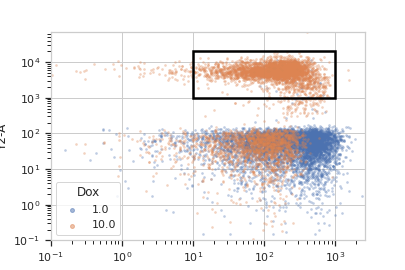
Show the default view.
>>> rv = r.default_view(huefacet = "Dox",
...                     xscale = 'log',
...                     yscale = 'log')
>>> rv.plot(ex)
Note
If you want to use the interactive default view in a Jupyter notebook, make sure you say
%matplotlib notebookin the first cell (instead of%matplotlib inlineor similar). Then calldefault_view()withinteractive = True:rv = r.default_view(huefacet = "Dox", xscale = 'log', yscale = 'log', interactive = True) rv.plot(ex)
Apply the gate, and show the result
>>> ex2 = r.apply(ex)
>>> ex2.data.groupby('Range2D').size()
Range2D
False    16405
True      3595
dtype: int64
- apply(experiment)[source]
Applies the threshold to an experiment.
- Parameters
experiment (
Experiment) – theExperimentto which this op is applied- Returns
a new
Experiment, the same as the old experiment but with a new column with a data type ofbooland the same as the operationname. The bool isTrueif the event’s measurement inxchannelis greater thanxlowand less thanxhigh, and the event’s measurement inychannelis greater thanylowand less thanyhigh; it isFalseotherwise.- Return type
- class cytoflow.operations.range2d.ScatterplotRangeSelection2DView[source]
Bases:
cytoflow.operations.range2d._RangeSelection2D,cytoflow.views.scatterplot.ScatterplotViewPlots, and lets the user interact with, a 2D selection.
- interactive
is this view interactive? Ie, can the user set min and max with a mouse drag?
- Type
Bool
- xchannel
The channels to use for this view’s X axis. If you created the view using
default_view, this is already set.- Type
Str
- ychannel
The channels to use for this view’s Y axis. If you created the view using
default_view, this is already set.- Type
Str
- xscale
The way to scale the x axis. If you created the view using
default_view, this may be already set.- Type
{‘linear’, ‘log’, ‘logicle’}
- yscale
The way to scale the y axis. If you created the view using
default_view, this may be already set.- Type
{‘linear’, ‘log’, ‘logicle’}
- op
The
IOperationthat this view is associated with. If you created the view usingdefault_view, this is already set.- Type
Instance(
IOperation)
- subset
An expression that specifies the subset of the statistic to plot. Passed unmodified to
pandas.DataFrame.query.- Type
- xfacet
Set to one of the
Experiment.conditionsin theExperiment, and a new column of subplots will be added for every unique value of that condition.- Type
String
- yfacet
Set to one of the
Experiment.conditionsin theExperiment, and a new row of subplots will be added for every unique value of that condition.- Type
String
- huefacet
Set to one of the
Experiment.conditionsin the in theExperiment, and a new color will be added to the plot for every unique value of that condition.- Type
String
Examples
In a Jupyter notebook with
%matplotlib notebook>>> r = flow.Range2DOp(name = "Range2D", ... xchannel = "V2-A", ... ychannel = "Y2-A")) >>> rv = r.default_view() >>> rv.interactive = True >>> rv.plot(ex2)
- class cytoflow.operations.range2d.DensityRangeSelection2DView[source]
Bases:
cytoflow.operations.range2d._RangeSelection2D,cytoflow.views.densityplot.DensityViewPlots, and lets the user interact with, a 2D selection.
- interactive
is this view interactive? Ie, can the user set min and max with a mouse drag?
- Type
Bool
- xchannel
The channels to use for this view’s X axis. If you created the view using
default_view, this is already set.- Type
Str
- ychannel
The channels to use for this view’s Y axis. If you created the view using
default_view, this is already set.- Type
Str
- xscale
The way to scale the x axis. If you created the view using
default_view, this may be already set.- Type
{‘linear’, ‘log’, ‘logicle’}
- yscale
The way to scale the y axis. If you created the view using
default_view, this may be already set.- Type
{‘linear’, ‘log’, ‘logicle’}
- op
The
IOperationthat this view is associated with. If you created the view usingdefault_view, this is already set.- Type
Instance(
IOperation)
- subset
An expression that specifies the subset of the statistic to plot. Passed unmodified to
pandas.DataFrame.query.- Type
- xfacet
Set to one of the
Experiment.conditionsin theExperiment, and a new column of subplots will be added for every unique value of that condition.- Type
String
- yfacet
Set to one of the
Experiment.conditionsin theExperiment, and a new row of subplots will be added for every unique value of that condition.- Type
String
Examples
In a Jupyter notebook with
%matplotlib notebook>>> r = flow.Range2DOp(name = "Range2D", ... xchannel = "V2-A", ... ychannel = "Y2-A")) >>> rv = r.default_view(density = True) >>> rv.interactive = True >>> rv.plot(ex2)